Built for the people who share the airplane—and the responsibility. See how it works

The complete platform

Everything the partnership shares.
Finally connected.

Start with a better schedule. Then connect the aircraft time, maintenance, expenses, source records, and people that make the schedule meaningful.

Built for the actual work

Clear enough for every partner to use.

Quick answers on a phone when you need them; full workflows and records when there is more to do.

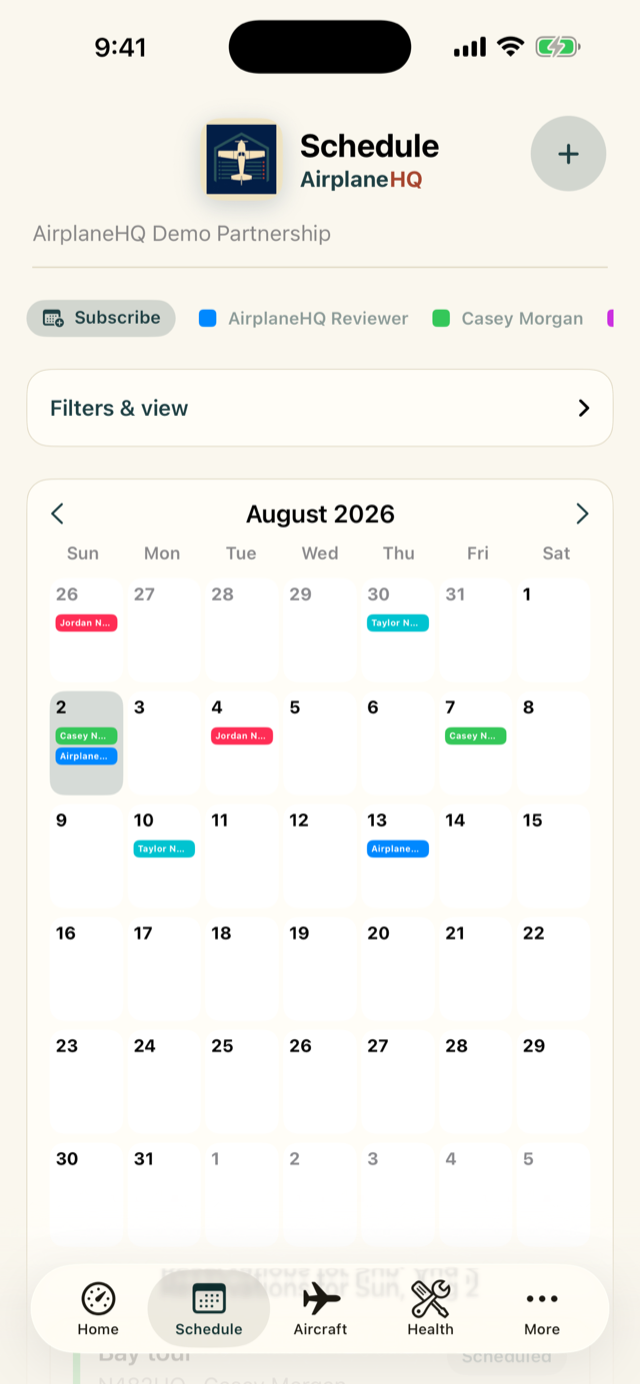
AirplaneHQ shared schedule on iPhone
Know when it’s freeShared scheduling with aircraft and member context.
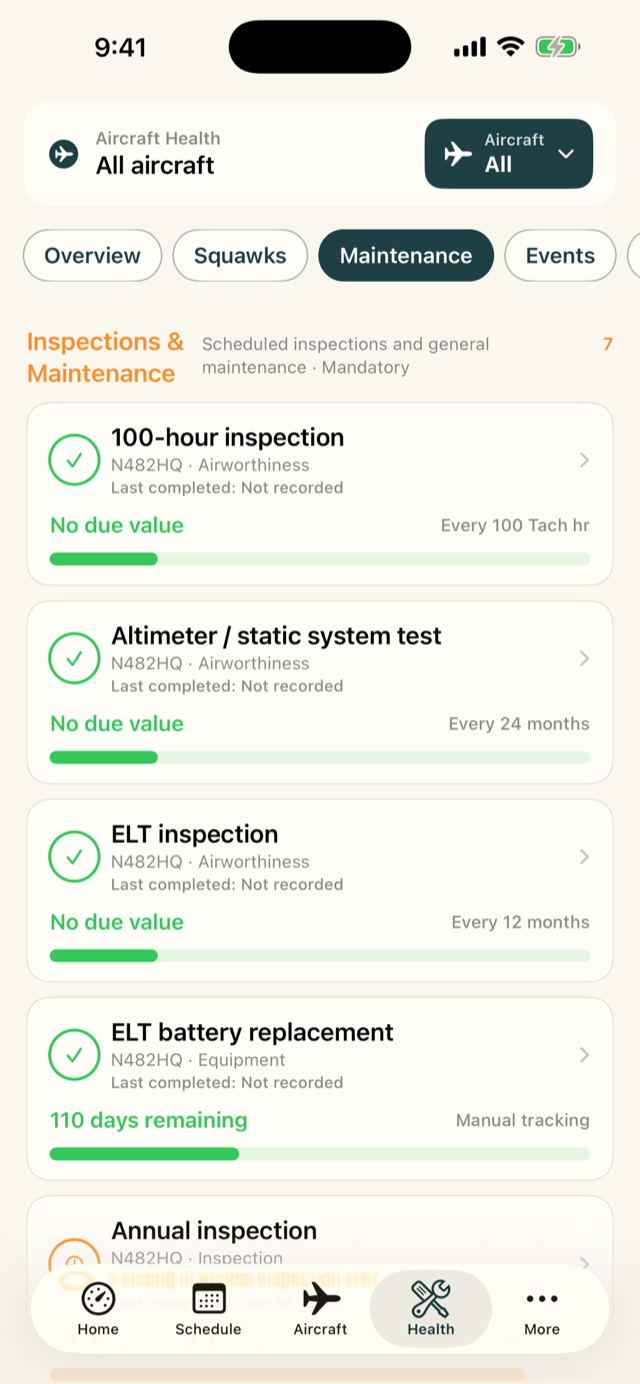
AirplaneHQ maintenance tracker on iPhone
Know what is coming dueDate and meter-based maintenance in one tracker.
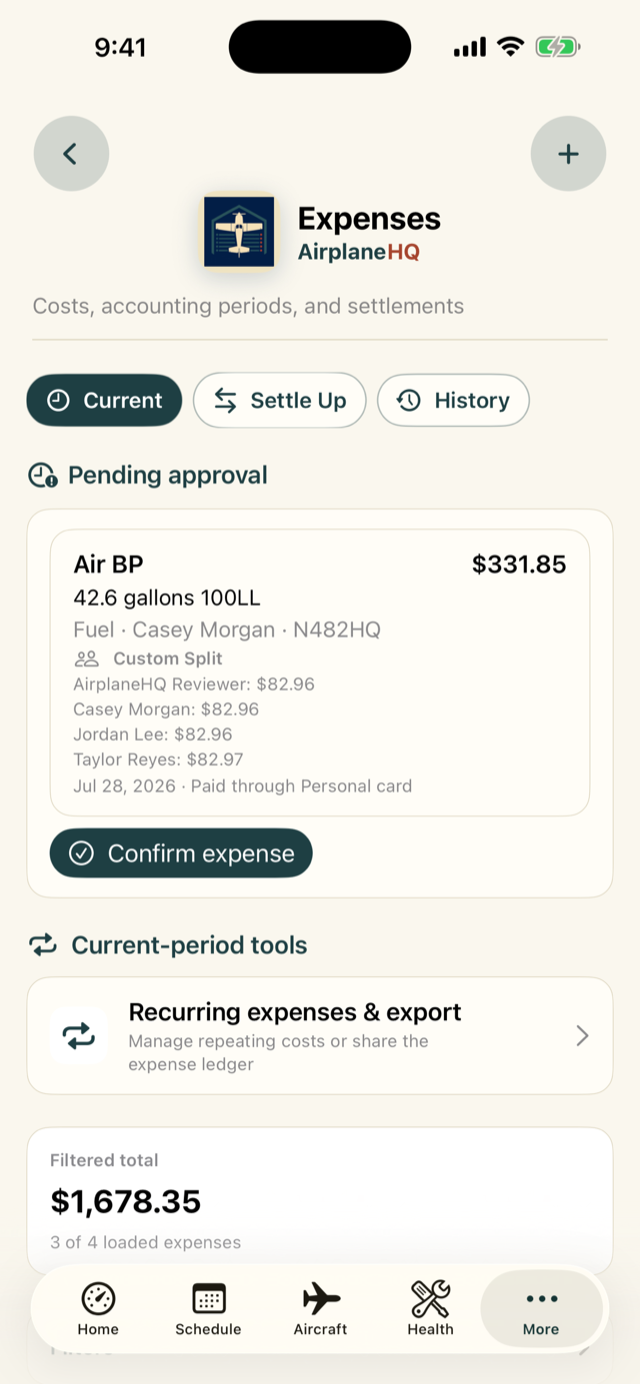
AirplaneHQ partnership expenses on iPhone
Know who owes whatSelected shares, balances, and settlement history.
01

Shared scheduling

Know when it is free—and what happens next.

Scheduling is the easy place to start. When the partnership is ready, a reservation can become the handoff for actual aircraft time, fuel, oil, and discrepancies.

Explore this workflow
One shared picture

See who has the airplane, when it returns, and what is available next—without a calendar thread or side conversation.

Rules at the point of booking

Apply booking windows, duration limits, buffers, aircraft access, qualifications, and maintenance restrictions before a reservation is accepted.

Recurring and instructional flying

Plan repeating reservations, instructor availability, instructor assignments, and all-day maintenance blocks.

Close the flight loop

Open the completed reservation to record tach, Hobbs, fuel, oil, destination, and an optional squawk so the aircraft picture stays current.

02

Aircraft health

Turn scattered due dates into an operating picture.

Current aircraft time turns a list of dates into a useful due picture, while completion history and source records explain how each item got there.

Explore this workflow
AVIATES and dual-limit tracking

See standard compliance context and track calendar, tach, or Hobbs limits together, including end-of-month behavior where appropriate.

Structured completion history

Keep the date, aircraft time, vendor, technician, outcome, notes, invoice, and logbook evidence behind every completion.

Service events

Group an annual, 100-hour, or other shop visit so several maintenance items, squawks, activities, and documents can be coordinated and completed together.

Squawks with accountability

Report discrepancies, set severity and status, assign ownership, add notes, and preserve the activity history.

03

Records and logbooks

Keep the source record connected to the decision.

Upload a receipt or maintenance invoice where the work happens and it is already organized in Records. From a manual to a selected logbook region, the source stays attached to what it explains.

Explore this workflow
Automatic context

Documents uploaded to expenses, maintenance items, completions, and events remain attached there while also appearing in the central Records library.

Version-aware records

Replace a file without erasing history, inspect prior versions, and restore when object-storage versioning is available.

One page at a time

Add a PDF or simply photograph a new sticker, then preview, rotate, reorder, remove, and place pages before committing them to the in-app logbook.

Review-first intelligence

OCR and optional AI can suggest a maintenance link; an authorized person reviews it before a whole page or selected region becomes evidence.

04

Partnership accounting

Make shared costs understandable before settle-up.

AirplaneHQ turns the shared ledger into an exact, reviewable settle-up plan without pretending to move the money itself.

Explore this workflow
The right people on each expense

Select exactly which members participate, split equally, or preserve custom shares—including historical participants.

Receipts in context

Attach receipts directly to expenses and keep vendor, category, date, status, and paid-through details searchable.

Recurring costs with review

Generate repeating expenses on a schedule while keeping new entries pending until an owner confirms the amount.

Settlement and period close

See who owes what, calculate a simpler set of suggested payments, record what was paid, and close the reviewed accounting period.

05

Members and access

Give every person the access their role requires.

Permissions follow the aircraft and the work—not an all-or-nothing admin switch.

Explore this workflow
Partnership roles

Separate owner/administrator, maintenance-manager, and member responsibilities.

Aircraft-specific access

Control whether a person can see, schedule, operate, or manage each aircraft.

Qualification context

Configure required qualifications and recent-flight currency, with a documented owner override when separately verified.

History-preserving offboarding

Move someone to former members and disable active access without deleting their operational or financial history.

06

Awareness and reporting

Surface the work without creating more noise.

Members choose channels and event preferences; owners get the context needed to act.

Explore this workflow
Channel preferences

Choose in-app, email, and mobile-push delivery by event category.

Maintenance awareness

Notify eligible members when opted-in requirements approach or pass their configured windows.

Operational reporting

Review utilization, flight activity, aircraft totals, expense history, category mix, and member rankings.

Actionable destinations

Notifications link back to the relevant schedule, aircraft, member, maintenance, or expense workflow.

Designed for accountability

Helpful automation. Human decisions.

AirplaneHQ calculates balances, due windows, and suggested logbook links, but keeps review in the loop. It does not certify data, release aircraft to service, move money, or replace required source records and professional judgment.

Free scheduling. Complete operations when you need them.

Choose the fit for your partnership.

Start free, then try every Premium workflow for 30 days. One $20 monthly subscription covers the whole partnership.